
Motor Test
Motor Test is the screen for directly testing a motor axis's JOG, move, and homing. It is used to inch an axis with JOG, move it to absolute or relative positions, and perform homing (Home) and servo ON/OFF, verifying motor wiring, direction of motion, and positioning accuracy. The entry path is System → Motor Test (Ctrl+3).
Selecting an axis in the left list shows that axis's current position and signal state in the right panel, where you can command moves with the operation panel. Speed profiles are covered in Motor Speed, and axis parameters in Motor Param and Motor Editor.
Pressing the JOG, move, or homing buttons physically moves the axis. Because it acts on connected equipment, confirm the axis travel path is safe and be ready to stop immediately with the
STOPorEMG STOPbuttons before operating.
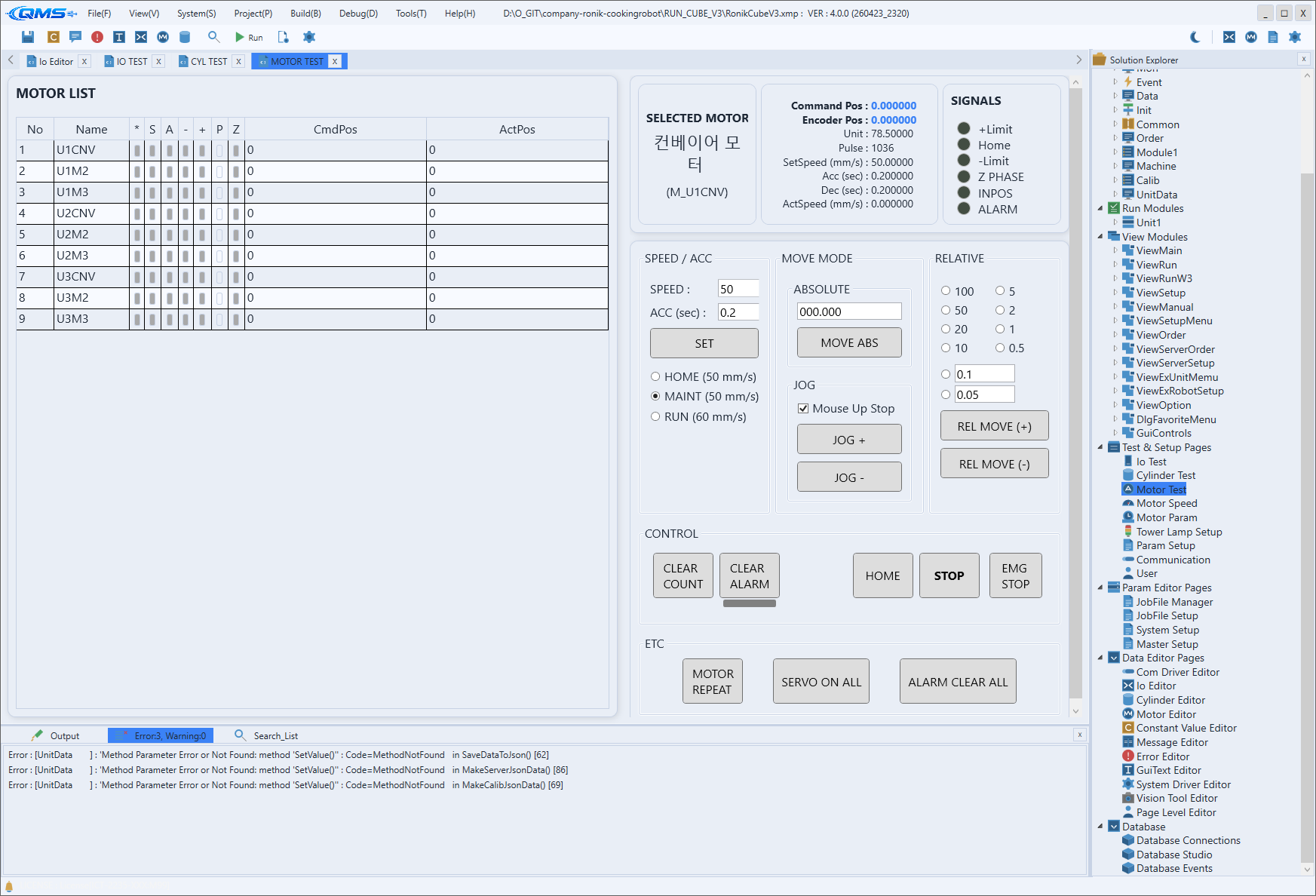
Main Areas
The screen is divided into a motor list on the left and a detail/operation panel on the right.
| Area | Description |
|---|---|
| MOTOR LIST | The left DataGrid. Shows the axis list along with In Motion, Home Done, Servo On, Alarm, Limit, In Position, and Z Phase status icons, plus CmdPos (command position) and ActPos (actual position). |
| SELECTED MOTOR | Shows the name and description of the selected axis. |
| Position/speed summary | Shows current values such as Command Pos, Encoder Pos, Unit, Pulse, set speed, Acc, Dec, and Act Speed. |
| SIGNALS | Indicates the IN MOTION, +Limit, Home, -Limit, Z PHASE, INPOS, and ALARM signal states with indicators. |
| STATUS | The fixed status bar at the bottom. Shows the operation result (normal/rejected/failed) as a message. |
Operation Panel
The operation panel consists of speed, move mode, control, and miscellaneous groups.
| Group | Function |
|---|---|
| SPEED / ACC | Enter SPEED and ACC (sec) values and apply with SET. The HOME, MAINT, and RUN radio buttons select a predefined speed set. |
| MOVE MODE | Provides ABSOLUTE (enter the target position, then MOVE ABS) and JOG (JOG +, JOG -; with Mouse Up Stop checked, releasing the button stops motion). |
| RELATIVE | Select a step size (100 to 0.5, or a user value) and move relatively with REL MOVE (+) and REL MOVE (-). |
| CONTROL | Contains the CLEAR COUNT, CLEAR ALARM, SERVO ON/OFF, HOME, STOP, and EMG STOP buttons. |
| ETC | Provides MOTOR REPEAT (repeated move), SERVO ON ALL, and ALARM CLEAR ALL. |
Workflow
- Open the screen via System → Motor Test (Ctrl+3).
- Select the axis to test in MOTOR LIST.
- Turn on the servo with
SERVO ON/OFF, and home it withHOMEif needed. - Set the speed in SPEED / ACC and apply with
SET. - Inch with
JOG +/JOG -, or move to a target position withMOVE ABS/REL MOVE. - In case of trouble, stop immediately with
STOPorEMG STOP.