
Motor Speed
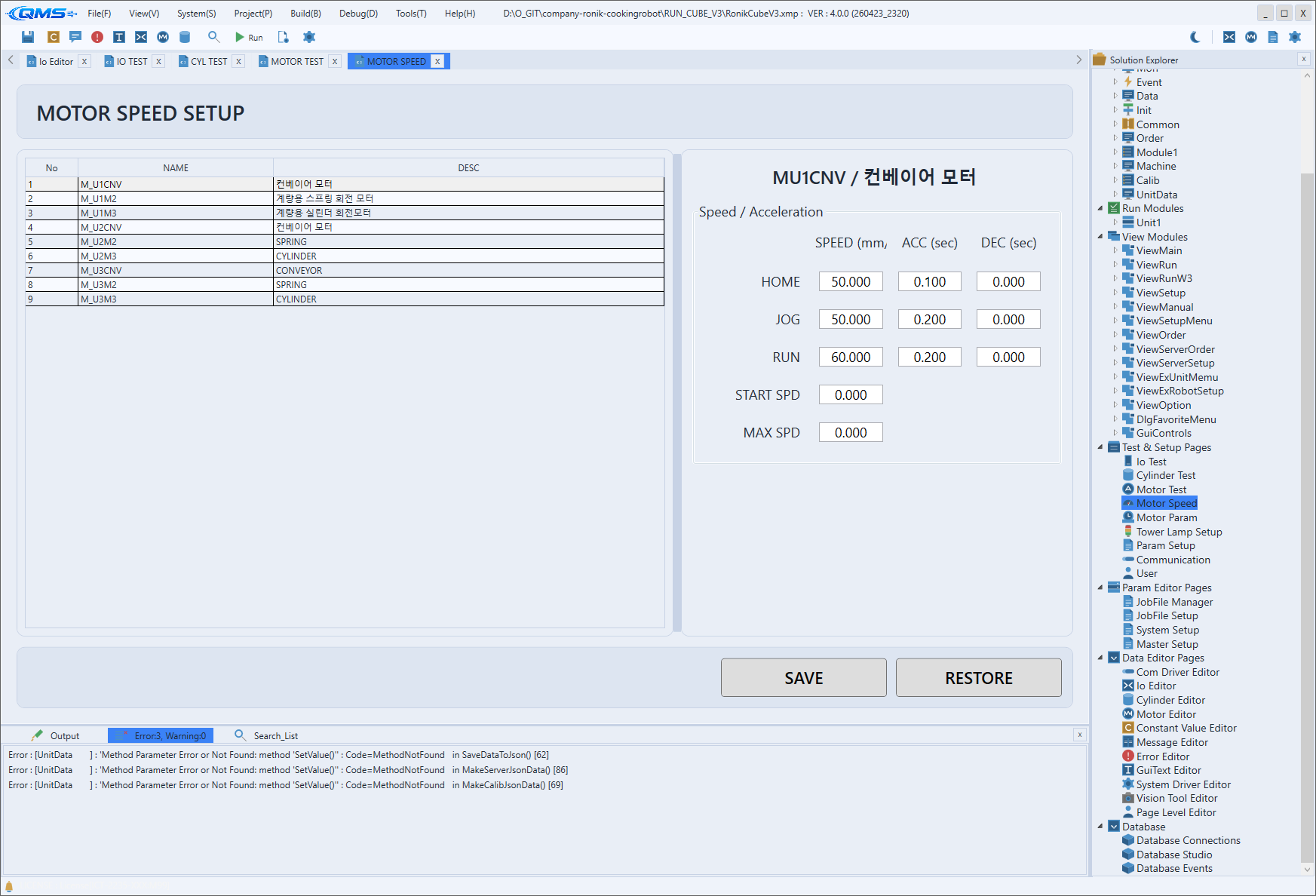
Motor Speed is the screen for setting per-motor speed profiles. Its title is MOTOR SPEED SETUP, and it defines named speed sets such as JOG speed, RUN speed, and acceleration/deceleration for each axis. The speed sets defined here are applied to a motor by calling them by name from a script. The entry path is System → Motor Speed.
Selecting an axis in the left motor list shows that axis's speed entry grid on the right. After entering
values, save with SAVE at the bottom, or use RESTORE to revert to the last saved values.
Main Areas
The screen consists of a motor list on the left, a speed entry grid on the right, and save buttons at the bottom.
| Area | Description |
|---|---|
| Motor list | The left DataGrid. The columns are No, NAME, and DESC; select the axis to configure. |
| Speed / Acceleration | The right entry grid. The rows are HOME, JOG, RUN, START SPD, and MAX SPD, and the columns are SPEED (mm/s), ACC (sec), and DEC (sec). |
| SAVE / RESTORE | The bottom buttons. SAVE saves the entered values, and RESTORE reverts to the last values. |
The HOME, JOG, and RUN rows take speed together with acceleration and deceleration, while the
START SPD and MAX SPD rows take speed only.
Parameters vs. Speed Profiles
The motor parameters covered in Motor Param and Motor Editor define an axis's physical and mechanical characteristics, such as the pulse/unit ratio, limits, and homing method. The speed profiles on this screen, by contrast, group by name how fast the same axis should move in different situations.
In other words, the parameters cover "how the axis is configured," while the speed profiles cover "when and
at what speed to move it." An axis therefore has one set of parameters, but multiple speed profiles such as
HOME, JOG, and RUN that you select per operating stage.
Script Integration
A defined speed set is applied in XScript by passing its name to the motor object's SetSpeed.
// Apply the run speed profile (RUN) to the axis, then move
MOTOR["M_SpindleT"].SetSpeed("RUN");
MOTOR["M_SpindleT"].MoveAbs(120.0, true);
Workflow
- Open the screen via System → Motor Speed.
- Select the axis to configure in the left list.
- Enter the
HOME,JOG,RUN,START SPD, andMAX SPDvalues in the Speed / Acceleration grid. - Save with
SAVEat the bottom. If you entered something wrong, revert withRESTORE. - In a script, call by name like
SetSpeed("RUN")to apply the speed suited to the operating stage.