
IO Test
IO Test is the screen for testing and monitoring digital inputs and outputs (DI/DO) in real time. It is used to check the current state of input signals by color and to force outputs ON/OFF, verifying board wiring and IO mapping. The entry path is System → Io Test (Ctrl+1).
The ID, name, and description of each signal are shown exactly as defined in the IO Editor. This screen therefore serves as a verification tool to confirm that the defined IO is correctly wired to the actual hardware.
Forcing an output ON drives the real devices connected to that signal, such as solenoids and relays. Because it acts on connected equipment, confirm that the surrounding area is safe before operating.
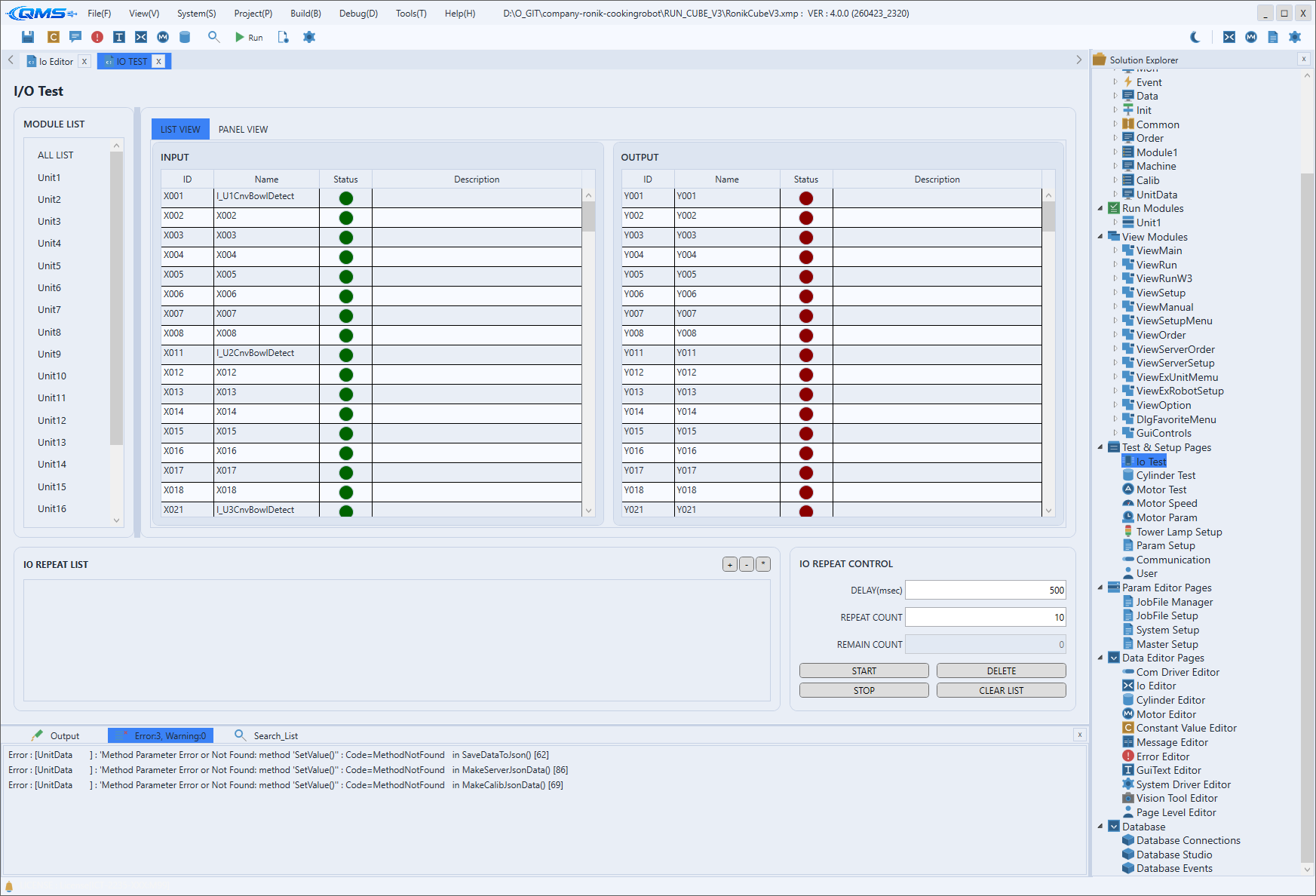
Main Areas
The screen consists of a module list on the left, a signal-view tab area on the right, and a repeat-test panel at the bottom.
| Area | Description |
|---|---|
| MODULE LIST | Select the IO module (board group) to monitor from the left list. |
| LIST VIEW tab | Shows INPUT and OUTPUT side by side as two DataGrids. The columns are ID, Name, Status, and Description. |
| PANEL VIEW tab | Groups signals into cards per module and board for an at-a-glance view. |
| Status indicator | Shows each signal's current state by the color of a round indicator. A B mark is added for b-contact signals. |
| IO REPEAT LIST / IO REPEAT CONTROL | The bottom panel. Configures a repeat test that toggles selected output signals ON/OFF at a fixed interval. |
Output Toggle and Repeat Test
Clicking an output signal's indicator in LIST VIEW or PANEL VIEW toggles that output ON/OFF. Input signals are read-only; their indicator color changes in real time according to the external sensor input.
In the bottom IO REPEAT CONTROL panel, set DELAY(msec) (the ON/OFF interval) and REPEAT COUNT (the
number of repetitions), then press START to begin. The remaining count is shown in REMAIN COUNT; use
STOP to halt and DELETE / CLEAR LIST to tidy the list.
Workflow
- Open the screen via System → Io Test (Ctrl+1).
- Select the IO module to inspect in MODULE LIST.
- View the signal list in the LIST VIEW or PANEL VIEW tab.
- Click an output signal's indicator to toggle it ON/OFF, and observe the color change of input signals.
- For repeated operation, set
DELAY(msec)andREPEAT COUNTin IO REPEAT CONTROL and pressSTART.