
Deployment Package Builder
This screen, titled Deployment Package Builder, is the tool for assembling and generating a deployment package for the field. You select with checkboxes which items to include—from the QMachineStudio application itself and the runtime project data—and then bundle them into a compressed package (zip) for export.
The screen consists of two groups, QMS and RUN, where you choose the items to include, and a CONTROL area that handles the output folder and the generation action. Each group has a Default button that resets it to the commonly used combination, and at the bottom are SAVE and RESTORE buttons that save the configuration.
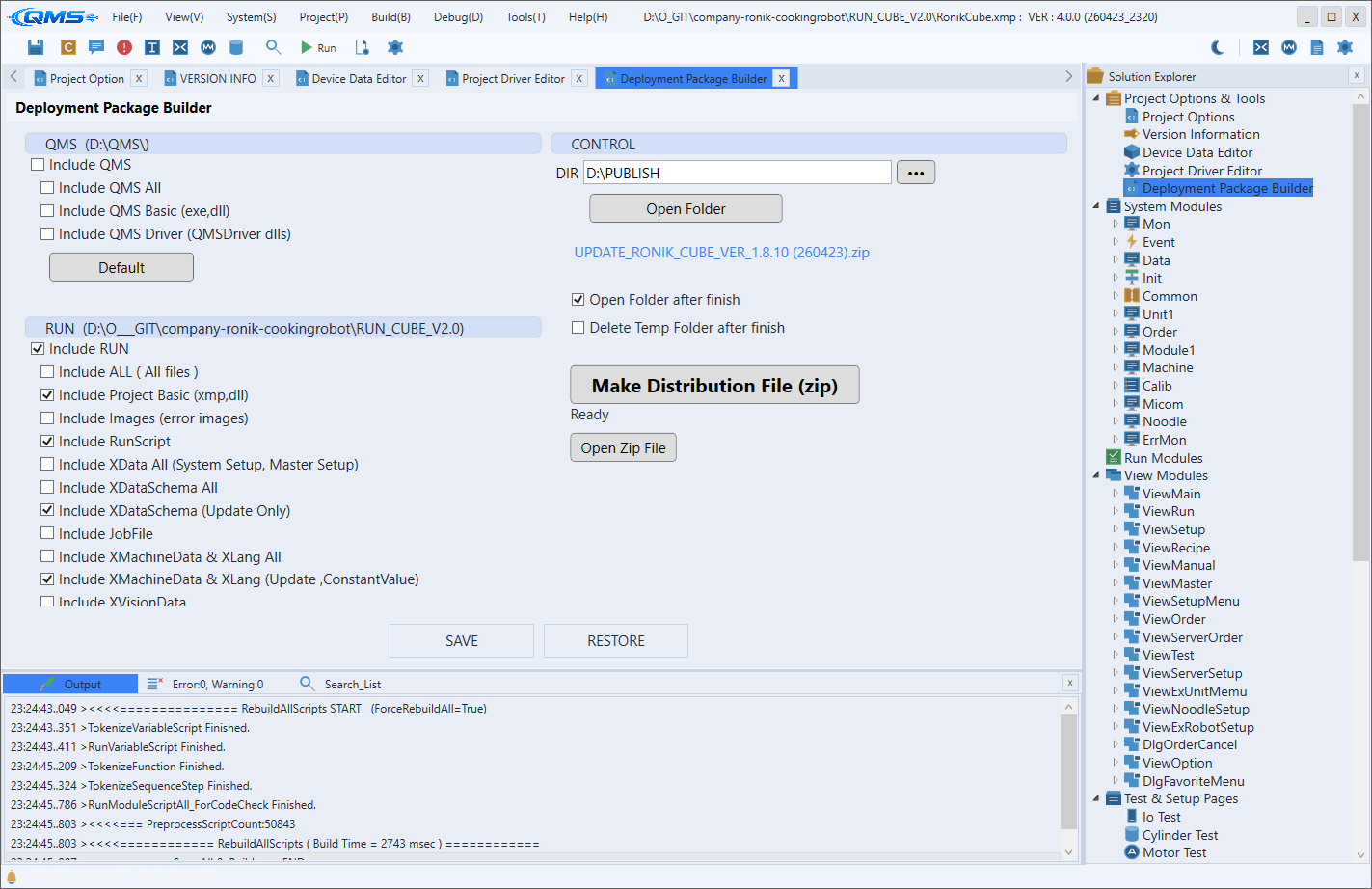
QMS Group
The QMS group selects how much of the QMachineStudio runtime environment (the application itself) to include in the package. Use it when installing the program for the first time on a new PC or when updating the application.
| Item | Included |
|---|---|
Include QMS | Top-level toggle for whether to include the QMS application |
Include QMS All | All QMS-related files |
Include QMS Basic (exe,dll) | The executable and basic DLLs |
Include QMS Driver (QMS_Driver dlls) | The QMS_Driver driver DLLs |
Default button | Resets the QMS group's check state to defaults |
RUN Group
The RUN group selects the scope of the runtime project data to include. You can choose items depending on whether you are deploying everything fresh or updating only the changes.
| Item | Included |
|---|---|
Include RUN | Top-level toggle for whether to include the RUN (project data) |
Include ALL ( All files ) | All files of the project |
Include Project Basic (xmp,dll) | Project basic files (xmp, dll) |
Include Images (error images) | Error images |
Include RunScript | Runtime scripts |
Include XData All (System Setup, Master Setup) | All XData including System Setup and Master Setup |
Include XDataSchema All | All XDataSchema |
Include XDataSchema (Update Only) | Only the changed XDataSchema |
Include JobFile | Job files |
Include XMachineData & XLang All | All XMachineData and XLang |
Include XMachineData & XLang (Update, ConstantValue) | The changes and constant values of XMachineData and XLang |
Include XVisionData | Vision data |
Default button | Resets the RUN group's check state to defaults |
The ...All items are suited to full deployment, while the Update Only and Update, ConstantValue items are suited to update deployments that apply only the changes to equipment already in operation.
CONTROL Area
The CONTROL area is where you specify where the package will be generated and run the generation action. After choosing the output folder, you create the package as a compressed file.
| Element | Purpose |
|---|---|
DIR | The output folder path where the package will be generated |
... button | Selects the output folder via the file browser |
DIR shows the selected output folder path. After specifying the folder and running the package generation, the configured items are bundled into a single compressed file and created in that folder.
Workflow
- Decide the inclusion scope depending on whether it is a new install or an update.
- In the
QMSgroup, select whether to include the application and its scope. Leave it empty if no application update is needed. - In the
RUNgroup, select the project data items. Choose...Allfor full deployment, or theUpdatefamily for change-only deployment. - To quickly set a standard combination, use the
Defaultbutton in each group. - Specify the
DIRoutput folder with the...button inCONTROL. - Run the package generation to create the compressed file, and if needed save the configuration with
SAVEat the bottom.